MeetCLI Developer Guide
Acknowledgements
We have used AI tools to help us with the ideation phase and to assist us in some parts of the codebase. Some of the localized logic (i.e the parsing logic for AddTagCommandParser, TagRegistry constructor) and some of the tests have been inspired and/or adapted. However, before commiting, we always manually verified all code pushed to ensure no regressions.
Setting up, getting started
Refer to the guide Setting up and getting started.
Design
Architecture
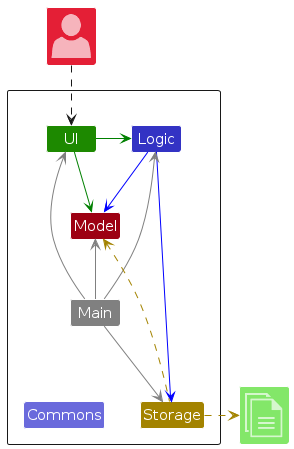
The Architecture Diagram above explains the high-level design of the App.
Main components of the architecture
Main (consisting of classes Main and MainApp) is in charge of the app launch and shut down.
- At app launch, it initializes the other components in the correct sequence, and connects them up with each other.
- At shut down, it shuts down the other components and invokes cleanup methods where necessary.
The bulk of the app's work is done by the following four components:
UI: The UI of the App.Logic: The command executor.Model: Holds the data of the App in memory.Storage: Reads data from, and writes data to, the hard disk.
Commons represents a collection of classes used by multiple other components.
Implementation
Next meeting field
The next meeting information is modelled as a dedicated value object (seedu.address.model.person.NextMeeting) so that validation, defaults, and equality checks stay consistent across the code base.
Parsing workflow
CliSyntax.PREFIX_NEXT_MEETING (m/)marks the optional input.AddCommandParserfalls back toNextMeeting.DEFAULT_VALUE("No meeting scheduled") when the prefix is absent, whileParserUtil.parseNextMeetingtrims and validates non-empty input.EditCommandParsermaps the prefix intoEditCommand.EditPersonDescriptor, enabling partial updates duringedit.
Model and storage
Personstores aNextMeetinginstance alongside existing identity and data fields.JsonAdaptedPersonserialises/deserialises the value, substituting the default string when the JSON omits the field so older save files continue to load.SampleDataUtilprovides illustrative values so that the UI demonstrates the field out of the box.
UI
PersonCardnow renders anextMeetinglabel insidePersonListCard.fxml, showingNext meeting: <value>so users can see at-a-glance follow-up details.
Scope decision (v1.5): We experimented with a richer
Meetingaggregate in v1.4 but removed it after integration issues. KeepingNextMeetingas a single value object lets us ship a reliable reminder while we refine the structured design for a later release.
Automated coverage lives in AddCommandParserTest, EditCommandParserTest, ParserUtilTest, and PersonTest, ensuring the prefix behaves correctly, invalid values are rejected, and equality semantics include the new field.
Tag commands (addtag and listtag)
MeetCLI extends the base AddressBook3 logic to support tag management commands.
Users can now add new tags to specific contacts and view all existing tags in alphabetical order.
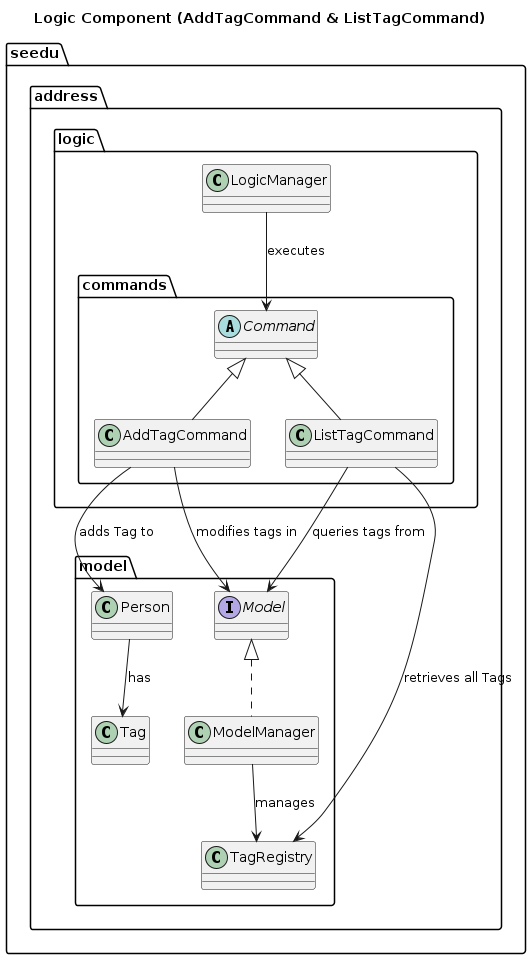
The diagram above illustrates how the new AddTagCommand and ListTagCommand integrate with the existing architecture:
- Both inherit from the abstract
Commandclass. LogicManagerorchestrates their execution via theModelinterface.ModelManagerimplements the tag-related operations, delegating to theTagRegistryandPersonclasses.AddTagCommandupdates a contact’s tag list, whileListTagCommandqueries and aggregates unique tags.
This separation maintains the command pattern used throughout the app and keeps the tag functionality modular and testable.
Documentation, logging, testing, configuration, dev-ops
Appendix: Requirements
Product scope
Target user profile:
- NUS students or working professionals who need to manage a significant number of contacts
- Prefer desktop apps over mobile/web apps
- Can type fast and prefer CLI over GUI
- Want to group contacts by tags (e.g., modules, CCAs, work projects)
- Comfortable with keyboard-based apps
Value proposition: Manage and retrieve contacts faster than typical GUI apps, with features tailored for grouping, filtering, and organizing by context (academic modules, CCAs, or work projects).
User stories
Priorities: High (must have) - ***, Medium (nice to have) - **, Low (unlikely to have) - *
| Priority | As a … | I want to … | So that I can … |
|---|---|---|---|
*** | new user | see usage instructions | learn how to use the app quickly |
*** | user | add a new contact | keep track of people I know |
*** | user | delete a contact | remove outdated or irrelevant entries |
*** | user | search for a contact by name | find details quickly |
*** | user | tag contacts by group/module | organize contacts into categories |
** | student | filter contacts by tag | view only project/module teammates |
** | user with many contacts | sort contacts by name | locate people easily |
** | busy user | import/export contacts from a file | avoid retyping data |
* | user | set reminders for specific contacts | remember to follow up |
Use cases
UC-01: Add a contact
Main Success Scenario (MSS):
- User enters
add n/<name> p/<phone> e/<email> a/<address> [c/<company>] [m/<meeting>] [t/<tag>...]. - MeetCLI validates all fields and saves the contact.
- MeetCLI shows “New person added:
”. - Use case ends.
Extensions:
- 1a. A required field is missing → MeetCLI shows the usage message and rejects the command; UC resumes at step 1.
- 2a. Any field fails validation (e.g., invalid email, phone, or duplicate tag) → MeetCLI shows the relevant error; UC resumes at step 1.
UC-02: Edit a contact
Main Success Scenario (MSS):
- User enters
edit INDEX [n/<name>] [p/<phone>] [e/<email>] [a/<address>] [c/<company>] [m/<meeting>] [t/<tag>...]. - MeetCLI validates the updated fields.
- MeetCLI updates the contact and shows “Edited Person:
”. - Use case ends.
Extensions:
- 1a. The given index is invalid → MeetCLI shows an error and the list remains unchanged.
- 1b. No fields provided → MeetCLI shows the command usage; UC resumes at step 1.
- 2a. Any updated field fails validation → MeetCLI shows the validation error; UC resumes at step 1.
UC-03: Find contacts by name/tag/company
Main Success Scenario (MSS):
- User enters
find [KEYWORD…] [t/<tag>...] [c/<company>...]. - MeetCLI validates requested tags against the tag registry and builds the filters.
- MeetCLI lists contacts matching the combined criteria.
- Use case ends.
Extensions:
- 2a. A requested tag is not in the registry → MeetCLI shows a warning and the filtered list is not updated.
- 3a. No contacts match → MeetCLI shows “0 persons listed!”; UC ends.
UC-04: List all tags
Main Success Scenario (MSS):
- User enters
listtag. - MeetCLI reads the tag registry and shows the alphabetical list of allowed tags.
- Use case ends.
Extensions:
- 2a. The registry has no tags → MeetCLI shows “There are currently no tags.”; UC ends.
UC-05: Clear the address book
Main Success Scenario (MSS):
- User enters
clear. - MeetCLI deletes all contacts and shows “Address book has been cleared!”.
- Use case ends.
Extensions:
- 1a. The address book is already empty → MeetCLI still reports success; UC ends.
UC-06: Delete a contact
Main Success Scenario (MSS):
- User requests to list all contacts.
- MeetCLI shows the list of contacts.
- User requests to delete a specific contact in the list.
- MeetCLI deletes the contact.
- Use case ends.
Extensions:
- 2a. The list is empty → Use case ends.
- 3a. The given index is invalid → MeetCLI shows an error; UC resumes at step 2.
UC-07: Tag contacts by module
Main Success Scenario (MSS):
- User requests to add a tag (e.g.,
t/CS2103T) to a specific contact. - MeetCLI updates the contact with the new tag.
- The updated contact is shown in the contact list.
- Use case ends.
Extensions:
- 1a. Tag already exists for the contact → MeetCLI prevents duplication and shows a message.
- 1b. Invalid tag format → MeetCLI shows an error; UC resumes at step 1.
Non-Functional Requirements
- Should work on any mainstream OS (Windows, Linux, macOS) with Java 17+.
- Should handle up to 1,000 contacts without noticeable performance issues.
- A user with above-average typing speed should be able to complete core tasks faster using CLI than with a GUI-based app.
- Data should be saved automatically after any modification.
- The app should start up within 2 seconds on a typical laptop.
- The system should be extensible for future modules/features (e.g., linking contacts to events).
Glossary
- CLI: Command Line Interface.
- Contact: A record representing a person with fields such as name, phone, and email.
- Tag: A label assigned to contacts for grouping (e.g., "CS2103T", "Family").
- Command: A textual instruction input by the user.
- Predicate: A functional interface in Java that evaluates a condition on an object and returns true or false. In MeetCLI,
Predicate<Person>is used extensively in filtering operations (e.g.,findcommand) to determine which contacts match user-specified criteria. Multiple predicates can be combined with logical AND/OR to create complex filters. - TagRegistry: A runtime component that maintains the allowed set of tag names for validation. It ensures consistency across
add,edit, andfindcommands by rejecting tags not in the registry. - NextMeeting: A value object that encapsulates a contact's next scheduled meeting It defaults to
"No meeting scheduled"when omitted. This field allows users to maintain a single, free-form reminder per contact for lightweight follow-up tracking. - Property Agent: A professional who manages and communicates with clients, buyers, and sellers. They can use MeetCLI to track clients, property listings, and follow-up meetings efficiently.
- Sales Professional: A user who manages a network of leads and customers. MeetCLI helps them tag and organise prospects, follow up on meetings, and maintain contact records.
- Business Developer: A user who focuses on expanding client relationships and partnerships. MeetCLI assists them in maintaining structured records of contacts and upcoming meetings.
- GUI (Graphical User Interface): A visual interface that allows users to interact with the app using buttons, menus, and forms. GUI-based apps are typically more intuitive for users unfamiliar with text commands.
Find command — multi-criteria search & allowed-tag validation
The find feature was extended to support name, tag, and company filtering in one command, plus a registry check that prevents searching with disallowed tags.
Overview
Syntax:
find [KEYWORD…] [t/TAG…] [c/COMPANY…]Semantics:
- Name: case-insensitive substring, multiple keywords are OR (match any).
- Tags: exact, case-insensitive; multiple
t/are AND (must have all). - Company: case-insensitive substring; multiple
c/are OR (match any). - Mixed criteria: name, tag, and company groups are combined with AND.
Allowed-tag validation: if any requested tag is not in
TagRegistry, the command shows a warning and does not update the filtered list.
Key classes (no new abstractions introduced)
FindCommandHolds the composed
Predicate<Person>and aList<String> requestedTagsused only for the registry check and message formatting.On
execute(model), ifrequestedTagsis non-empty:- Calls
model.getTagRegistry().isAllowed(tag)for each. - If any invalid → returns warning
CommandResult(no call toupdateFilteredPersonList). - Else →
model.updateFilteredPersonList(predicate)and returns summary viaMessages.getMessageForPersonListShownSummary(count).
- Calls
FindCommandParserTokenizes with
PREFIX_TAG (t/)andPREFIX_COMPANY (c/).Builds three predicates:
NameContainsKeywordsPredicate(OR across keywords).- Tag predicate (requires contact’s
Set<Tag>contains all required tags). - Company predicate (OR across substrings).
Combines present predicates with AND.
Validates tag format using
Tag.isValidTagName(parser-level); allowed-list is validated inFindCommand.execute.Returns
new FindCommand(combinedPredicate, rawTags)(passes raw tag names for the runtime registry check).
Design choice: format vs. policy. We keep format validation (e.g., illegal characters in a tag) in the parser, and policy validation (allowed vs. disallowed tag names) in the command at runtime so we can produce a non-fatal, user-friendly warning without throwing a parse error.
Edge cases & behaviours
Empty query: if no keywords, no tags, and no companies → parser throws usage error.
Empty
t/orc/values: parser throws usage error (e.g.,find t/).Invalid tag format: parser throws
ParseExceptionwithTag.MESSAGE_CONSTRAINTS.Disallowed tag(s): command returns
Cannot filter by invalid tag(s): <names>. Allowed tags: [<registry contents>]and leaves the list unchanged.
Equality and tests:
FindCommand.equalsincludes both the predicate and therequestedTagslist to avoid accidental equality between semantically different invocations.
Testability
Parser tests: cover
- name-only, tag-only, company-only, and mixed queries,
- multiple tag AND semantics,
- multiple company OR semantics,
- empty/invalid inputs (usage + constraints).
Command tests: cover
- allowed tags → filtered list updates + correct summary,
- disallowed tags → warning
CommandResult, no update toFilteredList, toString()includesrequestedTags(e.g., empty list[]for name-only).
Minimal call flow
LogicManager#execute("find …")AddressBookParser#parseCommand→FindCommandParser#parseFindCommandcreated with composedPredicate<Person>+requestedTagsFindCommand#execute(model):- validate tags against
TagRegistry→ warn or model.updateFilteredPersonList(predicate)→ summary viaMessages.getMessageForPersonListShownSummary(count)
- validate tags against